Case study · Own product · iOS
Turning bookmarks into a dock
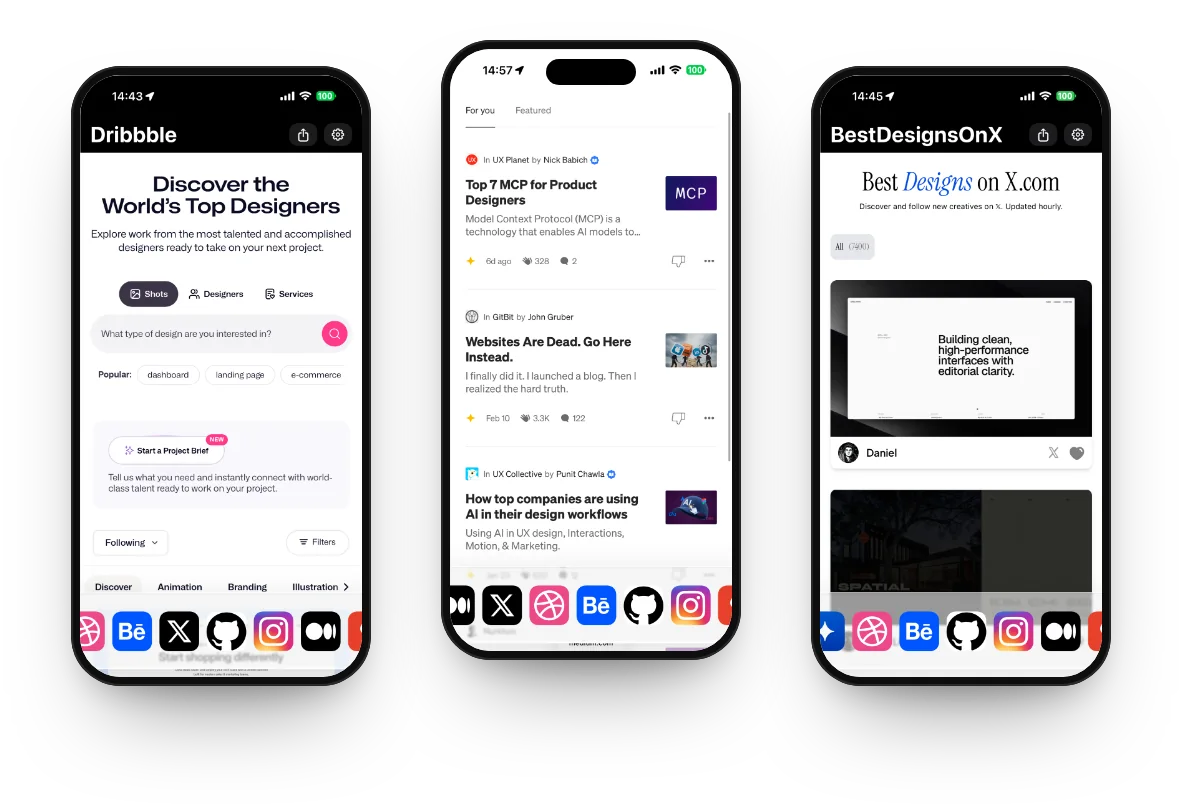
Vizor is my own iOS app for the sites people open every day. Instead of tabs and bookmarks, the sites sit in a floating dock of favicons at the bottom of the screen, one tap apart. I designed it, built it in SwiftUI in Xcode with Claude, Codex and Cursor, and run it on the App Store.
- Role
- Founder: product, design, development
- Platforms
- iPhone, iPad
- Stack
- SwiftUI, WebKit, iCloud, Claude, Codex, Cursor
- Price
- Free
Screen recording
Recorded on my iPhone: the live app, no edits. Pick a chapter to jump to it.
Vizor · iOS
What I did
- Found the problem in my own routine and defined the product
- Designed the dock, the browsing chrome and onboarding
- Built it in SwiftUI in Xcode with Claude, Codex and Cursor
- Shipped it to the App Store and iterated on it within weeks
The challenge
I open the same ten sites all day: AI tools, design galleries, developer docs. In a normal browser that means tabs that pile up, bookmarks three taps deep and a search bar for places I already know. I wanted those sites to behave like apps in a dock, without installing ten apps.
Approach and design decisions
Start with your sources
Onboarding offers curated sites in four groups: AI, design, development and everyday. People pick what they use, add any URL from Settings, or send the page they are on to the dock from the share sheet.
A dock, not tabs
The sites live in a floating dock of favicons. One tap switches site, the dock scrolls when it fills up, and it shrinks into a small pill that hides itself while you read.
Browsing that feels native
A Safari-style progress bar, skeleton loading and edge swipes for back and forward: small details that make a web page feel like part of the app rather than a page inside it.
Made for iOS 26
On iOS 26 the dock is Liquid Glass; on earlier versions it falls back to an ultra-thin material. The dock syncs over iCloud between iPhone and iPad, and a memory and disk cache keeps favourite sites quick to open.
Private and free
No account and no tracking: the App Store privacy label reads Data Not Collected, and the app is free.
How I used AI
Vizor went from a personal itch to the App Store with AI in the loop: exploring the interaction, writing the SwiftUI code and testing edge cases. Version 1.2 followed three weeks after 1.0. AI makes the first version fast; I decide what stays.
The outcome
A free, live app for iPhone and iPad that turns the sites you use most into a dock, and proof of how quickly a designer can go from an idea to a shipped product with AI.